
Интеграция Socket IO
Для работы с вебсокетами, как мы уже говорили, существует библиотека socket.io. Мы её использовали в предыдущей версии фронтэнда на jquery. Так же у них есть пакет для использования с Angular-ом. Установим его:
npm install ngx-socket-io
Для лучшей организации кода, все запросы, которые будем отправлять на сервер через вебсокеты, будем хранить в отдельном сервисе. Назовём его socket.service и создадим:
ng generate service socket.service
Сгенерированные файлы перенесём в frontend/services/socket
Минимальный рекомендованный 'конфиг':
// src/app/socket.service.ts
import { Injectable } from '@angular/core';
import { io, Socket } from 'socket.io-client';
import { Observable } from 'rxjs';
@Injectable({
providedIn: 'root'
})
export class SocketService {
private socket: Socket;
constructor() {
this.socket = io('http://localhost:3000'); // Replace with your server URL
}
// Emit an event to the server
emit(eventName: string, data: any): void {
this.socket.emit(eventName, data);
}
// Listen for an event from the server
on(eventName: string): Observable<any> {
return new Observable(observer => {
this.socket.on(eventName, (data: any) => {
observer.next(data);
});
});
}
// Handle disconnection
onDisconnect(): Observable<any> {
return new Observable(observer => {
this.socket.on('disconnect', (reason: string) => {
observer.next(reason);
});
});
}
}
Начнём добавлять динамику в нашу вёрстку. Страница создания игры, шаблон компонента: create-game-page.html
- добавим директиву ngModel для того чтобы связать поле ввода количества игроков с переменной компонента numberOfPlayers
- добавим обработчик события для кнопки CREATE
<input class="w-72 max-w-full py-4 border-2 border-white rounded-lg text-white text-xl font-semibold tracking-wide transition hover:bg-white hover:text-black text-center"
placeholder="NUMBER OF PLAYERS" [(ngModel)]="numberOfPlayers" />
<button class="w-72 max-w-full py-4 border-2 border-white rounded-lg text-white text-xl font-semibold tracking-wide transition hover:bg-white hover:text-black"
(click)="createGame()">
CREATE
</button>
Код компонента (контроллер): create-game-page.ts
import { Component, inject } from '@angular/core';
import { Router } from '@angular/router';
import { OnInit, OnDestroy } from '@angular/core';
import { SocketService } from '../services/socket/socket.service';
import { Subscription } from 'rxjs';
import { FormsModule } from '@angular/forms';
@Component({
selector: 'app-create-game-page',
imports: [FormsModule],
templateUrl: './create-game-page.html',
styleUrl: './create-game-page.css'
})
export class CreateGamePage implements OnInit, OnDestroy {
private router = inject(Router);
private messageSubscription: Subscription = new Subscription();
numberOfPlayers: number = 3;
constructor(private socketService: SocketService) {}
ngOnInit(): void {
this.messageSubscription = this.socketService.on('create-game-response').subscribe((data: any) => {
console.log('Game created=',data);
this.router.navigate(['/waiting-others-to-join']);
});
}
ngOnDestroy(): void {
if (this.messageSubscription) {
this.messageSubscription.unsubscribe();
}
}
createGame(): void {
console.log('creating game...');
this.socketService.emit('create-game', {
numberOfPlayers: this.numberOfPlayers
});
}
}
Здесь мы используем subscription, для подписки на серверное событие create-game-response и рутер, для перенаправления на страницу ожидания: router.navigate(). Пока что количество игроков жестко прописано как 3.
Если бэк и фронт запускаются на разных серверах, то может возникнуть проблема из-за CORS. Чтобы её решить надо добавить опции для сервера.
const io = new Server(server, {
cors: {
origin: "*",
methods: ["GET", "POST"]
}
});
Проверим если это работает. В одном терминале запускаем бэк, в другом фронт. Жмём кнопку Create Game.
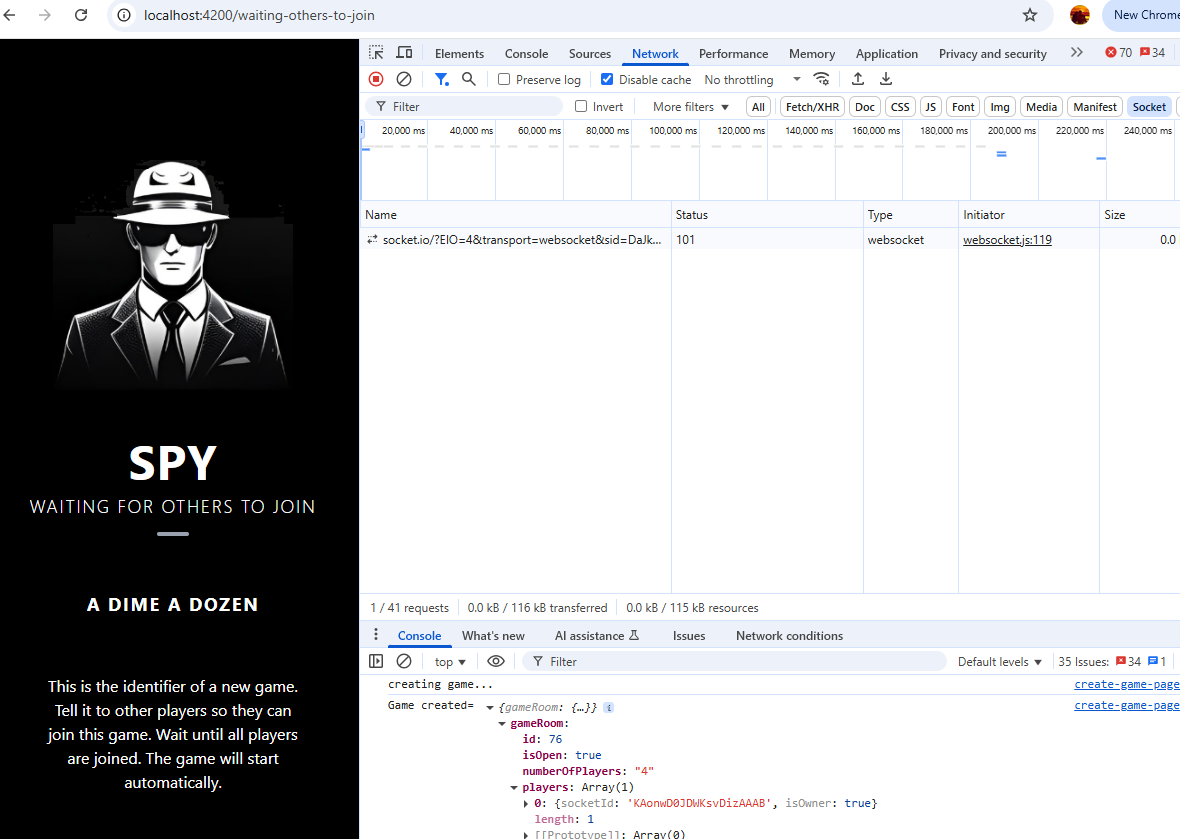
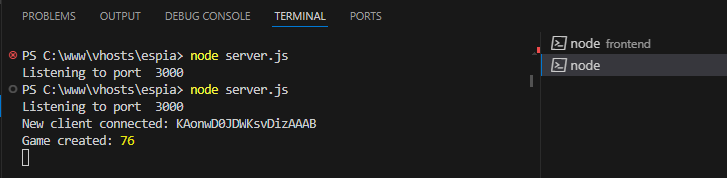
Как видно соединение вебсокета установлено, новая игра с id 76 создана, а также произошло перенаправление на страницу ожидания.
Навигация
Чуть выше мы уже видели принудительный (программный) переход по url при помощи router.navigate(). Сейчас рассмотрим случай навигации по ссылкам. Как раз то что нам необходимо для перехода с главной страницы на страницу создания новой игры или присоединения к существующей. Для создания ссылок используется RouterLink. Добавим его в main-page.ts
import { RouterLink } from '@angular/router';
@Component({
selector: 'app-main-page',
imports: [RouterLink],
И ссылки по кнопкам в main-page.html
<div class="flex-1 flex flex-col items-center justify-start gap-6 mt-8">
<button routerLink="/create-game" class="w-72 max-w-full py-4 border-2 border-white rounded-lg text-white text-xl font-semibold tracking-wide transition hover:bg-white hover:text-black">
CREATE A GAME
</button>
<button routerLink="/join-game" class="w-72 max-w-full py-4 border-2 border-white rounded-lg text-white text-xl font-semibold tracking-wide transition hover:bg-white hover:text-black">
JOIN GAME
</button>
Управление состоянием (state management)
При создании новой игры мы как-то должны передавать id и title из одного компонента в другой: create-game-page -> waiting-others-to-join-page. Будем использовать объект с полями {id, title}. Самый простой способ - это injectable сервис. Создадим его:
ng g service services/game-state/game-state.service --skip-tests
Содержимое game-state.service.ts
import { Injectable } from '@angular/core';
export interface GameInterface {
id: number;
title: string;
context: any;
}
@Injectable({
providedIn: 'root'
})
export class GameStateService {
private data: any;
setData(data: GameInterface): void {
this.data = data;
}
getData(): GameInterface {
return this.data;
}
}
Тут мы определили интерфейс GameInterface с полями: id, title и context. Объект data для хранения данных, сеттер и геттер.
Забегая немного вперёд, скажу что в поле context мы будем хранить ответ серверного события ‘start-game’, для того чтобы передать его из компонента waiting-others-to-join-page в компонент game-page.
Добавим (inject) этот сервис в компоненты где он нужен. Начнём с create-game-page.ts
import { GameStateService } from '../services/game-state/game-state.service';
…
constructor(private socketService: SocketService, private gameStateService: GameStateService) {}
ngOnInit(): void {
this.messageSubscription = this.socketService.on('create-game-response').subscribe((data: any) => {
console.log('Game created=',data);
//set state
const gameRoom = data.gameRoom;
this.gameStateService.setData({
id: gameRoom.id,
title: gameRoom.title,
context: null
});
waiting-others-to-join-page.ts
import { GameInterface, GameStateService } from '../services/game-state/game-state.service';
gameData: GameInterface;
constructor(private socketService: SocketService, private gameStateService: GameStateService) {
this.gameData = gameStateService.getData();
console.log('Game state',this.gameData);
}
this.messageSubscription = this.socketService.on('start-game').subscribe((data: any) => {
console.log('Starting the game');
this.gameData.context = data;
//this.gameStateService.setData(this.gameData);
//change page
this.router.navigate(['/game']);
});
join-game-page.ts
import { Component, inject } from '@angular/core';
import { OnInit, OnDestroy } from '@angular/core';
import { Router } from '@angular/router';
import { Subscription } from 'rxjs';
import { SocketService } from '../services/socket/socket.service';
import { GameInterface, GameStateService } from '../services/game-state/game-state.service';
@Component({
selector: 'app-join-game-page',
imports: [],
templateUrl: './join-game-page.html',
styleUrl: './join-game-page.css'
})
export class JoinGamePage implements OnInit, OnDestroy {
private router = inject(Router);
private listGamesSubscription: Subscription = new Subscription();
private joinGameSubscription: Subscription = new Subscription();
private joinGameErrorSubscription: Subscription = new Subscription();
games: any;
constructor(private socketService: SocketService, private gameStateService: GameStateService) {}
ngOnInit(): void {
/**
* Render a list of the games after
* server response to list-games-request
*/
this.listGamesSubscription = this.socketService.on('list-games-response').subscribe((data: any) => {
console.log('listing-games-from-server', data);
this.games = data.games;
});
/**
* User succesfully joined the game
* server response to join-game-request
*/
this.joinGameSubscription = this.socketService.on('join-game-success-response').subscribe((data: any) => {
console.log('Joined, canStart='+data.canStart);
//set auth token in order to have for autorejoin after reconnection on server side
this.socketService.setAuth({
gameRoomId: this.gameStateService.getData().id
});
//if canStart then back tick with autostart
if (data.canStart) {
console.log('Get ready...');
//consider navigating directly to game page from here, not through waiting for others
//TODO
}
//change page
this.router.navigate(['/waiting-others-to-join']);
});
/**
* Handle error joining the game
* server response to join-game-request
*/
this.joinGameErrorSubscription = this.socketService.on('join-game-error-response').subscribe((data: any) => {
console.error('Could not join', data);
//TODO handle
});
//list available games to join to
this.socketService.emit('list-games-request', null);
}
ngOnDestroy(): void {
if (this.listGamesSubscription) {
this.listGamesSubscription.unsubscribe();
}
if (this.joinGameSubscription) {
this.joinGameSubscription.unsubscribe();
}
if (this.joinGameErrorSubscription) {
this.joinGameErrorSubscription.unsubscribe();
}
}
joinGame(gameRoom: GameInterface): void {
console.log('selected game', gameRoom);
//send join request to serve
this.socketService.emit('join-game-request', {
gameId: gameRoom.id
});
//set state and navigate to waiting-for-others
this.gameStateService.setData({
id: gameRoom.id,
title: gameRoom.title,
context: null
});
//wait for server response: join-game-success-response | join-game-error-response
}
}
Присоединение к игре
До сих пор на странице присоединения к игре у нас была одна жестко прописанная в вёрстке игра. Пришло время исправим это. Будем отображать динамически сформированный список доступных игр, полученный с сервера. Начнём с шаблона join-game-page.html
<ul>
@for (item of games; track item.id) {
<li class="w-80 max-w-full text-white text-center text-lg tracking-widest mt-2 font-bold uppercase cursor-pointer"
(click)="joinGame(item)">{{ item.title }}</li>
}
</ul>
Как видно из кода, при помощи @for итерируем массив games, генерируя объекты <li>
Игра
game-page.ts
import { GameInterface, GameStateService } from '../services/game-state/game-state.service';
import { Component, inject } from '@angular/core';
import { OnInit, OnDestroy } from '@angular/core';
import { Router } from '@angular/router';
import { Subscription } from 'rxjs';
import { SocketService } from '../services/socket/socket.service';
@Component({
selector: 'app-game-page',
imports: [],
templateUrl: './game-page.html',
styleUrl: './game-page.css'
})
export class GamePage implements OnInit, OnDestroy {
private router = inject(Router);
private messageSubscription: Subscription = new Subscription();
gameData: GameInterface;
imgUrl: string;
isOwner: boolean;
constructor(private socketService: SocketService, private gameStateService: GameStateService) {
this.gameData = this.gameStateService.getData();
this.imgUrl = "";
this.isOwner = false;
}
ngOnInit(): void {
this.messageSubscription = this.socketService.on('start-game').subscribe((data: any) => {
console.log('Next round');
this.gameData.context = data;
this.startNewGame();
});
this.startNewGame();
}
startNewGame(): void {
console.log('Starting the game');
this.gameData = this.gameStateService.getData();
const data = this.gameData.context;
const socketId = this.socketService.getSocketId();
this.imgUrl = data.spyId == socketId ? data.spyImg : data.img;
this.isOwner = data.ownerId == socketId;
}
ngOnDestroy(): void {
if (this.messageSubscription) {
this.messageSubscription.unsubscribe();
}
}
nextRound(): void {
this.socketService.emit('next-turn-request', null);
}
}
Тут мы определили основную функцию startNewGame, которая как и в предыдущей версии на jQuery определяет картинку и owner-а текущего раунда. При инициализации компонента подписываемся на серверное событие start-game и запускаем игру.
В game-page.html добавим динамический src для картинки и условное отображение для кнопки Next round
<!-- Middle Block: Title (fixed height) -->
<div class="flex flex-col items-center justify-center p-8">
<img [src]="imgUrl" alt="Random image"
class="shadow-lg object-cover border-2 border-white rounded-lg" />
</div>
<!-- Bottom Block: Buttons -->
<div class="flex-1 flex flex-col items-center justify-start gap-6 mt-8">
@if (isOwner) {
<button class="w-72 max-w-full py-4 border-2 border-white rounded-lg text-white text-xl font-semibold tracking-wide transition hover:bg-white hover:text-black"
(click)="nextRound()">
NEXT ROUND
</button>
}
</div>
Всё то о чём мы говорили до сих пор можно скачать по кнопке ниже. Директории node-modules для бэкэнда и фронтэнда я удалил из архива, поэтому надо будет выполнить: node -i
Продолжение следует ...